


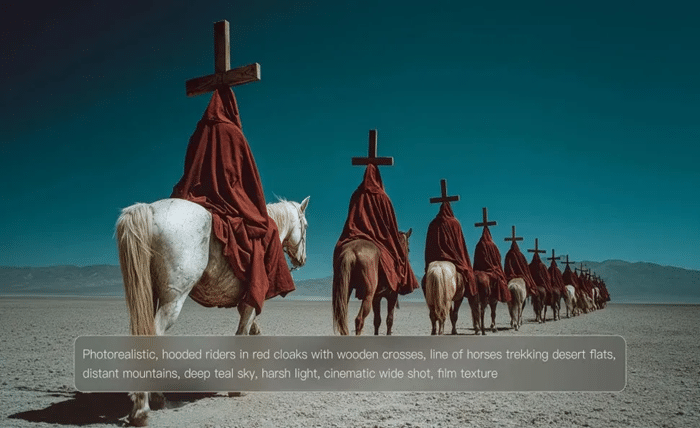
Lighting determines how viewers feel about an image before they notice its subject. A portrait under warm sunset light tells a different story than the same portrait under cool studio lighting. AI image generation works the same way. Instead of treating lighting as a final adjustment, successful creators define it from the beginning. By describing light direction, intensity, color, atmosphere, and interaction with the scene, users can guide AI toward images that feel believable, expressive, and visually polished.
Build Better Lighting Before You Generate
Describe the Light Instead of Naming the Mood
Many prompts ask for “dramatic,” “soft,” or “beautiful” lighting, but those words leave plenty of room for interpretation. Better prompts explain exactly how the light behaves inside the scene. Specify whether the main light comes from a window, a streetlamp, or the setting sun. Mention if shadows should remain sharp or diffuse. Describe whether highlights should wrap gently around a subject or create strong contrast. These details provide structure that AI can interpret more consistently. A carefully written prompt gives the model enough information to construct realistic illumination rather than guessing what “cinematic” or “professional” might mean for a particular composition.
Every Scene Benefits From a Lighting Strategy
Professional photographers rarely place lights randomly. They choose lighting based on the purpose of the image. Product photography often favors clean, even illumination that reveals materials and colors accurately. Character portraits frequently use directional lighting to add depth and emotion. Landscapes may rely on sunrise or sunset to create long shadows and visual richness. Applying the same thinking improves AI-generated artwork. An AI image generator from text responds more effectively when lighting decisions support the story instead of existing as decorative effects. Rather than adding glowing highlights everywhere, think about why each light source exists and how it shapes the environment around it.
References Make Complex Lighting Easier to Explain
Some lighting setups are difficult to describe using words alone. Multi-colored neon reflections, studio rim lighting, or layered cinematic scenes often contain subtle relationships between brightness and shadow. Visual references simplify this process. Instead of writing increasingly complicated prompts, creators can provide images that demonstrate the lighting style they want to achieve. Kling AI supports optional reference images for composition, style, products, characters, and visual appearance, giving the model a clearer foundation before generation begins. References do not replace prompts. Instead, they work alongside written instructions to communicate lighting direction more precisely while reducing unnecessary trial and error.
Refine Lighting Until the Image Feels Natural
Small Adjustments Produce Big Visual Changes
Lighting does not need dramatic changes to improve an image. Often, subtle refinements create the strongest results. Moving from cool daylight to warm evening light changes the emotional tone immediately. Increasing shadow softness creates a calmer atmosphere, while stronger contrast introduces energy and tension. Instead of rewriting an entire prompt after every attempt, many experienced creators adjust one lighting variable at a time. This controlled workflow reveals which change produced the improvement. Kling IMAGE 3.0 allows creators to refine generated images by adjusting composition, lighting, and visual details while preserving the strongest parts of the original concept. Gradual refinement keeps creative direction consistent without forcing users to begin every generation from scratch.
Match Lighting Across an Entire Project
Individual images may look impressive on their own, yet still feel disconnected when presented together. Marketing campaigns, comics, presentations, storyboards, and social media collections all benefit from visual continuity. Consistent lighting helps separate a polished creative project from a random collection of images. Keeping similar color temperatures, shadow intensity, and light direction throughout a series allows viewers to focus on the content rather than noticing stylistic changes. Kling IMAGE 3.0 Omni supports cohesive image series with intentional shot progression and unified creative direction, making it easier to maintain lighting consistency across multiple scenes while still allowing each image to present a unique composition.

Think Like a Photographer, Not Just a Prompt Writer
The strongest AI-generated images often come from creators who borrow ideas from photography and filmmaking. They think about where the camera sits, where the light originates, and how surfaces reflect illumination throughout the environment. Instead of filling prompts with dozens of descriptive adjectives, they define the physical conditions of the scene. Questions such as “What is the primary light source?” or “Where should the brightest area appear?” often lead to better results than searching for more stylistic keywords. Kling AI fits naturally into this workflow because users can combine descriptive prompts, optional visual references, iterative refinement, and even continue successful images into Image-to-Video projects without abandoning the original lighting direction that established the scene.
Conclusion
Controlling lighting in AI-generated images begins long before pressing the Generate button. Clear descriptions, realistic lighting strategies, useful reference images, and thoughtful refinement all contribute to stronger visual outcomes. Rather than relying on broad artistic terms, creators achieve greater consistency by treating light as a deliberate design element that shapes every part of the composition. With tools such as Kling AI, users can guide lighting through prompts, references, detailed adjustments, and cohesive project workflows, producing images that feel natural, expressive, and professionally crafted while supporting a wide variety of creative goals.