


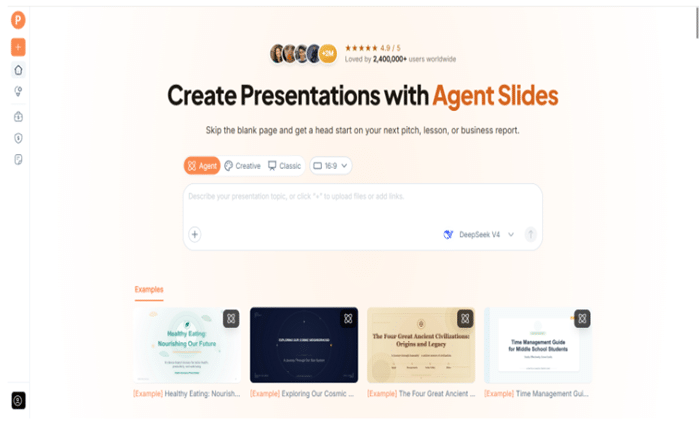
A presentation tool can look versatile until you discover that every task follows the same path. AI PPT Maker takes a different approach by offering Agent, Creative, and Classic modes.
The distinction is worth examining because presentation work varies. Sometimes the main problem is explaining a difficult subject. Sometimes visual expression carries much of the message. Sometimes you need a dependable template and a file you can revise elsewhere.
AI PPT Maker gives those needs different starting points. Choosing well means looking beyond the mode names and considering the finished work.
(Create presentations with AI PPT Maker’s Agent, Creative, and Classic modes)
The Shared Foundation Comes First
Agent, Creative, and Classic support the same broad input sources: text, uploaded files, webpages, and video sources.
All three also allow you to review and adjust an outline before generating slides.
This is an important foundation. Choosing a mode does not mean abandoning the source material or skipping the structure review.
A teacher, analyst, founder, or creative professional can begin with existing content and specify the audience, purpose, and relevant boundaries.
The Mode Changes the Approach
The choice concerns how you want to develop the presentation and what you need afterward.
Agent provides a conversational route. Creative emphasizes visual expression. Classic follows a template-based approach.
Their export options also differ, which makes the decision more practical than a preference for one style over another.
Agent Suits a Brief That Is Still Developing
Agent mode in AI PPT Maker supports multi-round conversation.
That is useful when your explanation improves as you work. The initial request may establish the topic, while later messages clarify the audience or the main point.
For example, a project brief might first describe progress. A follow-up could explain that the meeting is actually about resolving a dependency.
The added context gives the presentation request a clearer purpose.
Specific Follow-Ups Are the Advantage
The conversational feature works best with identifiable gaps.
Instead of “make it more professional,” explain what needs attention:
Introduce the audience’s problem before describing the proposal. Use only the examples in the source notes.
That instruction gives you something concrete to check.
Agent also includes AI image generation and exports PPTX, allowing further editing in PowerPoint. It is a useful combination for people who need to develop the explanation and continue refining the deck after generation.
Creative Puts Greater Weight on Visual Expression
Creative mode in AI PPT Maker is relevant when the visual treatment forms part of the message.
A concept introduction, creative direction, or visual proposal may benefit from pages that do more than arrange text in a standard layout.
The key practical detail is the download format: Creative exports PNG images.
That can suit finished visual pages, but it is different from receiving editable PowerPoint text and shapes.
Decide How the Pages Will Be Used
If you expect frequent wording changes in PowerPoint, an image-based output may be less convenient.
If the finished visual page is the deliverable you need, PNG can be appropriate.
Neither situation makes the mode universally better or worse. The review should connect the format to the task.
AI PPT Maker is easier to assess when you know the next step before choosing Creative.
Classic Provides a Template-Based Route
Classic in AI PPT Maker offers a structured approach using templates.
More than 1,000 templates provide choices for different presentation styles. The practical value is having a visual framework rather than designing every page independently.
For recurring reports, lessons, or internal briefings, consistency can be useful. Readers learn where to find the headline, supporting information, and next action.
The Download Choices Are Broader
Classic supports PPTX with or without animation, PDF, Keynote, outlines in TXT or Markdown, and image download options.
These are different output choices, not evidence that every mode has identical exports.
For someone who needs a PowerPoint file and a separate reading copy, Classic offers a relevant set of options.
Check the actual deliverable rather than judging the workflow solely from the on-screen preview.
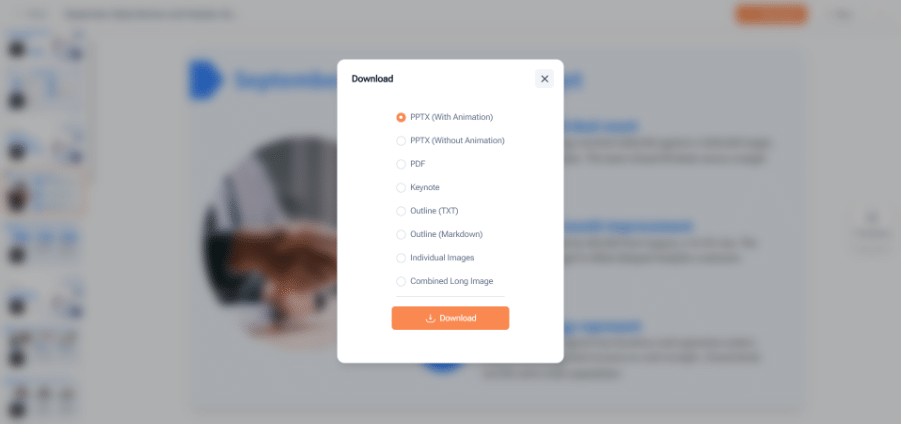
(AI PPT Maker with Multiple Format Downloads )
A Compact Comparison
| Mode | Main appeal | Confirmed download direction |
| Agent | Developing the brief through conversation | PPTX |
| Creative | Visually expressive presentation pages | PNG images |
| Classic | Template-based structure and output choices | PPTX, PDF, Keynote, outlines, and image options |
This comparison is a starting point. The quality of a particular draft still depends on the source, instructions, and review.
Outline Review Matters in Every Mode
The visual approach does not rescue a weak sequence.
Before generating slides with AI PPT Maker, read the outline from the audience’s perspective.
Does the opening establish the subject? Does the evidence arrive before the recommendation? Have important limitations survived the summary?
This check is especially useful when the source document was written for a different purpose.
A research paper, sales report, and proposal each need a presentation structure suited to the meeting.
Image Generation Has a Defined Role
Agent’s AI image generation can help illustrate an idea.
Use generated visuals where conceptual illustration is appropriate, and label them when necessary. They should not be presented as evidence of an actual event, experiment, product, or completed project.
For factual explanation, actual approved images and verified diagrams remain important.
AI PPT Maker’s visual capabilities add options; they do not remove the need to choose the right kind of evidence.
A Fair Comparison Uses the Same Brief
When comparing modes, start with the same familiar source and presentation purpose.
Assess the outline, readability, content accuracy, and usefulness of the download. Do not rely only on which preview looks most attractive.
Also consider how much revision the task requires.
A consultant expecting detailed PowerPoint changes may prioritize something different from a creator preparing finished visual pages.
Other options include PPT Maker and NoteGPT’s AI Slide Generator. Within AI PPT Maker, the first useful comparison is often between its own three approaches.
Choose the Workflow Before the Look
AI PPT Maker is most compelling when its mode choice matches the work you need to complete. Use Agent for a developing brief, consider Creative for visual pages, and explore Classic for templates and broader output options. Try AI PPT Maker(https://aipptmaker.ai/) with a clear deliverable in mind, then inspect the outline and exported result. Keep PPT Maker(https://pptmaker.io/) in mind as another option as you assess the right workflow.